![Bluestone_PIM_white_logo_RBB-3.png]](https://help.bluestonepim.com/hs-fs/hubfs/Bluestone_PIM_white_logo_RBB-3.png?height=50&name=Bluestone_PIM_white_logo_RBB-3.png)
The Bluestone PIM MCP Server needs to be configured inside your chosen LLM as a custom connector/plugin before you can utilise it.
Note: We are continuously expanding our library of supported tools. If you have ideas or requests for new tools, share them with us.
Introduction
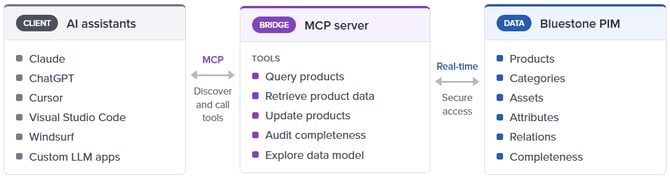
The Bluestone PIM Model Context Protocol (MCP) server acts as a real-time bridge between your product information and AI applications (such as Claude, ChatGPT, or custom LLM interfaces).
Once configured as a custom connector within your chosen AI client, it enables your AI assistant to securely query, retrieve, and work with your product data directly.
What is MCP?
MCP is an open standard for connecting AI assistants to external systems. An MCP server exposes a set of tools that any MCP-compatible client can discover and call. For Bluestone PIM this means one integration that works across Claude, ChatGPT, Cursor, Visual Studio Code, Windsurf, and other clients. No custom plugin per tool.
Who is it for?
The MCP server is useful for anyone who works with product data in Bluestone PIM. Product information managers can query and update products through conversation instead of navigating the UI. Data quality teams can audit completeness and channel coverage. Developers and integration engineers can explore the data model or automate enrichment. Technical leads can combine Bluestone PIM with other MCP-enabled systems in larger AI workflows.
What you can do
The server gives agents access to the full Bluestone PIM data model:
-
Products (single, group, variant) and variant group assignment
-
Product attribute values across all types, including context-scoped reads and writes
-
Product relations such as cross-sell, related, and accessories
-
Product labels for tag-style grouping and filtering
-
Completeness scores and requirements per product, context, and catalog
-
Product media, including upload through the pre-signed S3 flow
-
Product history: who changed what, when, and from where
-
Catalogs and catalog nodes, and product-to-node assignment
-
Attribute definitions (simple, dictionary) and relation types
-
Contexts (language and market combinations)
-
Asset search, upload, metadata, and media-bank labels
-
Publishing: trigger syncs, view publish history, read the diff between authored and published state
-
Workflow tasks: list, create, assign, comment, and complete
-
Platform documentation search, so the assistant can answer questions about Bluestone PIM with citations
Schema administration (creating complex attribute types, managing relation schemas, configuring completeness requirements) stays in the UI. Low-level per-entity publish writes are not exposed either, since hand-building publish environments is an integration task rather than an agent task.
Ready to configure? Head over to our guide Connect to the Bluestone PIM MCP server.
Talk to your catalogue
Once connected, your assistant speaks Bluestone PIM. The workflows below are examples of things that take many clicks in the UI and one sentence through MCP.
Find gaps and fill them in one pass
"Find products in the SALE catalog that have no SEO title or SEO description in the English context. For each one, generate an SEO title and meta description based on the product name, category, and key attributes, and write them back."
The assistant searches for the gap, proposes a sample of generated values for you to sanity-check, confirms scope, and applies the changes in bulk. Context fallback and attribute type handling are taken care of by the tools.
Bulk tidy-up after an ERP import
"Look at the products in the NEW FROM ERP catalog. Group them into variant groups based on shared base SKU and differing colour or size attributes, then move the resulting groups into the main product catalog."
One request covers filtering, clustering, variant group creation, variant assignment, and catalog assignment. The agent reports what it plans to do before touching any data.
Localize a context from another
"Fill missing short descriptions in the French context using the English values as source, keeping the tone consistent with existing French products."
The assistant reads the English value, generates a French version in the style of content already in the French context, and writes it back with the correct context scoping.
Compliance and quality reviews
"Review the marketing description of every product in the EU catalog and flag anything that may violate European marketing and consumer laws. Open a task for each product that needs a rewrite and assign it to the content team."
This is where having an LLM in the loop pays off. The model reviews free-text content for issues a rule engine cannot catch, and the MCP tools turn each finding into a real task with a product reference, assignee, and comment.
Catalog readiness before a launch
"Show me every product in the Spring 2026 catalog with a completeness score below 90 in the German context. List the top three missing requirements across that set so I know where to focus."
The agent pulls scores and per-requirement pass/fail data, aggregates across the product set, and gives you a prioritised view of what to fix first.
Publish diff narrative
"Summarise what has changed in the B2C catalog since the last publish. Group by category and highlight products where price or availability changed."
The agent reads the publish diff, groups and summarises the raw change list, and produces a readable release note you can paste into a change log.
Audit a specific product
"Who changed the price attribute on SKU-4421 over the last 90 days, and what were the previous values?"
History queries return the full before-and-after trail with user, timestamp, and origin.
Manage media end to end
"Upload the three images in this folder to the media bank, tag them with 'Spring 2026', and attach them to SKU-4400 as additional assets."
The agent runs the full upload flow (init, S3 upload, finalise), applies labels, and updates the product's asset list.
Security and governance
Every connection is authenticated through Bluestone's own OAuth sign-in. There is no API key or client secret to configure. When you add the MCP server to your client, you'll be sent to your browser to sign in as yourself, and the assistant then acts with your own Bluestone PIM permissions for the rest of the session.
Under the hood this is a standard OAuth 2.1 authorization-code flow with PKCE. A user who can view a record may still be unable to update or delete it; the MCP server enforces the same read/write distinction your existing roles and policies already define. For this reason, it's worth connecting with a dedicated user or role scoped to only what the task needs, rather than an admin's own account, when practical.
Test and Production are separate endpoints, and you can connect to both at once as two distinct, separately-authenticated connections. Connecting one does not sign you into or sync data with the other.
Write safety is a discipline your AI client should follow, not a switch Bluestone flips on your behalf. The recommended pattern is:
read → plan → confirm → execute → verify
Before any change, a well-behaved assistant should show you the exact records, current and proposed values, and how it will confirm the result afterward — and wait for your explicit go-ahead before calling a write tool. You can configure this "manual approval" flow on the LLM side.
To revoke access after an offboarding, a lost device, or just to switch which Bluestone user a client acts as, disconnect and re-authenticate from your MCP client's own connection settings. Closing a chat does not sign you out of the server.
No product data is shared with third-party AI providers by Bluestone PIM itself. Data handling for whatever you connect is governed by that tool's own terms. If your client sends conversation context to an external LLM provider, review its policy to understand what's transmitted and retained.
Availability
The external MCP server is now available to all customers. Technical details are available here. Feel free to reach out to us at support@bluestonepim.com with questions or contact your Customer Success Manager for a demonstration.
An experimental sandbox and community tooling are available at Bluestone PIM Labs. Use Bluestone PIM Labs for inspiration, all resources are forkable to support you in creating your own solutions.