![Bluestone_PIM_white_logo_RBB-3.png]](https://help.bluestonepim.com/hs-fs/hubfs/Bluestone_PIM_white_logo_RBB-3.png?height=50&name=Bluestone_PIM_white_logo_RBB-3.png)


- Catalog & category search by number
Catalogs and categories can now be searched by number in addition to name, making it easier to locate items when you know the number but not the full name.
A new toggle lets administrators show or hide category numbers alongside category names: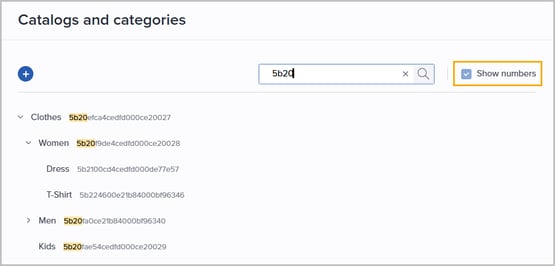
- Shopify connector: Easily manage product data sync from Bluestone PIM
You can now manage the synchronization of product data from Bluestone PIM to one or more Shopify stores in an easy way.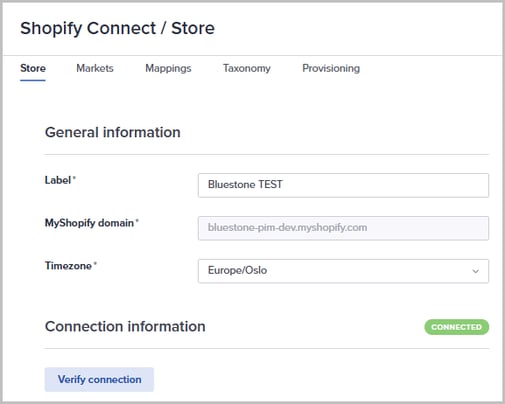
Please visit the Shopify App Store to learn more.
Interested in trying it out? Reach out to our support team: support@bluestonepim.com - AI-powered rules: Automate product enrichment!
ℹ️ Currently available in the Test environment ℹ️
You can now start saying goodbye to manual data entry! Leverage AI within the Rules engine to populate product attributes automatically.
Using your images and current data as input, this feature guarantees high-quality, consistent content across all your sales channels. Please see the Help documentation for details.
Interested in trying it out? Reach out to our support team to learn more: support@bluestonepim.com - AI Image enhancer
ℹ️ Currently available in the Test environment ℹ️
We’re introducing AI-powered image enhancement directly in Bluestone PIM.
A new tab can be made available in the Asset's details panel, where users can prompt the AI - powered by Google’s Nano Banana - for improved visuals and editing support.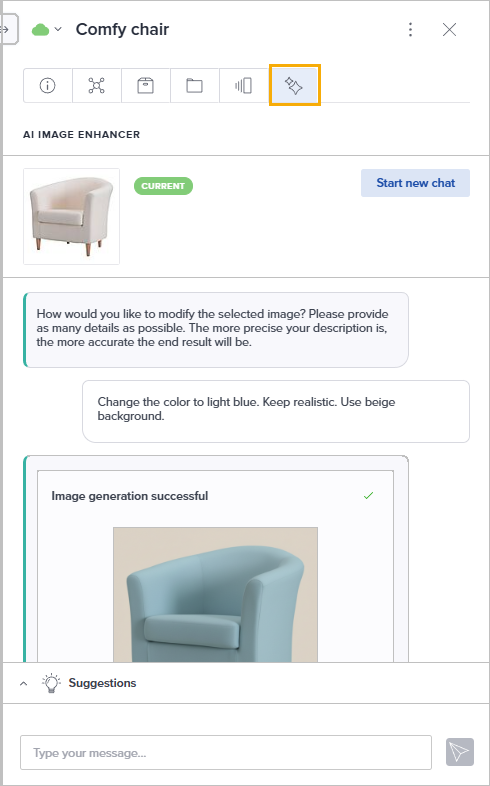
Interested in trying it out? Reach out to our support team to learn more: support@bluestonepim.com
Improvements
- Improved performance for large category trees
We have significantly improved search and display performance for category trees with large numbers of subcategories, now supporting up to 2,000 subcategories per parent category or catalog. Further capacity expansions are planned. - Improved UX for Dictionary attribute definitions
Managing dictionary definition values is now smoother and more intuitive. The updated interface reduces unnecessary steps when creating, and editing values, making it faster to maintain your attribute definitions: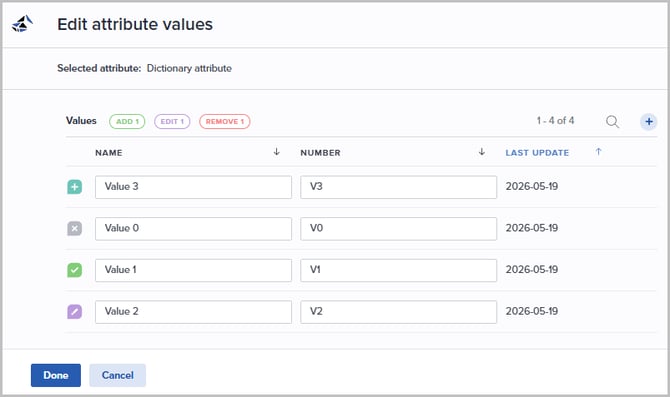
- Faster initial load of the Products grid
The product grid now uses horizontal virtualisation, significantly reducing the time it takes to load the initial view - especially for views with a large number of columns. Only the columns visible in your viewport are rendered at any given time, resulting in a noticeably snappier experience when opening the grid. - PPE: Performance optimization
Experience a faster, more fluid workflow with our latest performance optimizations! Switching between the grid and product details is now instant, and you can start editing immediately while data loads in the background. No more interruptions, just seamless productivity. - Assets: Extended filter operators
The 'Assigned products' and 'Assigned categories' filters in the Assets page now support a broader set of filter operators, giving you more precise control over how you filter assets: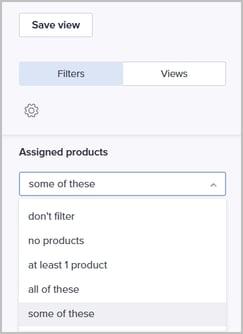
- PPE: Enhanced attribute value visibility
Dictionary and Multiselect attribute value pills now display their full values whenever space permits. This reduces the need to hover over truncated text, allowing you to see complete product information at a glance:
- Global synchronization of product filters
Product filters are now synchronized across the main grid and all product linking modals. Any updates to the setup apply everywhere automatically, bringing the full power of your filters to every selection screen for a faster, more consistent workflow: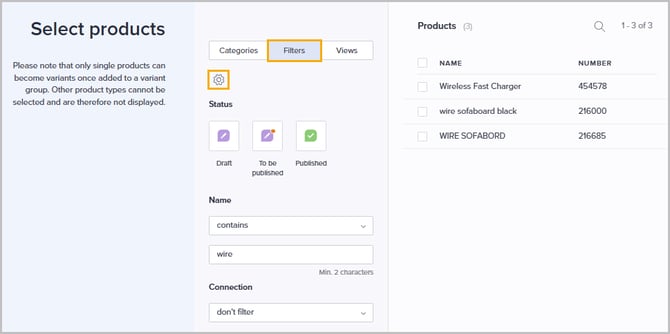
Fixes
- Fixed: Asset bulk edit attributes - Add or remove values
Resolved an issue with the bulk edit attributes action for assets where "Add value to existing" and "Remove value from existing" were not working correctly. - Resolved: Product filters not rendering correctly (hotfixed May 20)
Resolved an issue where attribute-based filters in the Products filter panel were displaying incorrectly - attribute names appeared untranslated, dropdown menus returned no values, and input fields were missing. Filters based on standard fields such as name and description were unaffected. - Fixed: Products exported without attribute values (hotfixed May 20)
Resolved an issue where exporting products via the JSON Importer Service would produce exports with attribute values missing. - Resolved: Child dictionary attribute filter appearing empty (hotfixed May 25)
Resolved an issue where the 'Filters' dropdown would appear empty when filtering values based on a parent value. This affected child dictionary attributes with more than 100 values. - Fixed: History on boolean attribute not showing correct current value
Resolved a parsing issue in the attribute history modal where boolean values with non-lowercase formatting (e.g. "True", "TRUE") were not being recognized as "Yes". Boolean values are now normalized, so all casing variations are handled correctly.
- Resolved: Error when removing the last label from an asset
Resolved an issue where attempting to remove the last remaining label from an asset would result in an error. - Fixed: Missing filter pills for Asset media type filters
Resolved an issue where loading a Saved view containing the legacy single media type filter would not display filter pills, making it appear as though only a few assets existed. - Resolved: Error when removing products or attribute definitions
Fixed an issue where deleting a product or attribute definition could return a '500 internal server error' if the organization had no initialized usage metric. These cases are now handled gracefully. - Resolved: 'Last updated' mismatch
Fixed an inconsistency where the Last updated values shown in the query builder did not match those displayed in the Products grid. Both now reflect the same timestamp, ensuring that filter results are accurate and reliable. - Resolved: Asset count in System Monitor
Fixed an issue where the total asset count displayed in the System Monitor became out of sync with the actual filter result on the Assets page after assets were updated. The count is now refreshed correctly, providing an accurate view of your asset library at all times. - Resolved: Incorrect Dictionary value limit reporting
Fixed an issue causing dictionary attributes to falsely report they had reached their maximum value limit. Reporting is now accurate, and users can add values as intended.