![Bluestone_PIM_white_logo_RBB-3.png]](https://help.bluestonepim.com/hs-fs/hubfs/Bluestone_PIM_white_logo_RBB-3.png?height=50&name=Bluestone_PIM_white_logo_RBB-3.png)


- Products: List all related products in grid
We’ve added a direct link within the Relations tab that loads all related products into the grid view. This feature eliminates manual searching, enabling you to apply mass edits to accessories, spare parts, and other related entities in just a few clicks. Please see the Help documentation for more information.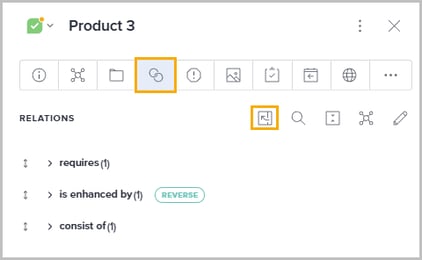
- MAPI: Download internal assets
We have provided a new endpoint in the mediabank service, allowing you to download original (not transformed) internal assets. Please refer to the API documentation for details. - Assets: Faster filtering
Navigate your assets faster with a completely refreshed UI and instant-apply logic. This cleaner, more intuitive design removes friction by updating your results in real-time as you filter. Please see the Help documentation for details. - Assets: Attribute-based filtering
Drill down into your library with the new ability to filter directly by specific asset attributes. This provides granular control over your data, ensuring you can find exactly what you need with precision. Please see the Help documentation for more information. - Assets: Customizable filter panel
Optimize your workflow by tailoring the filter panel to your specific needs. Administrators can also extend these efficiencies by creating tailored setups for specific colleagues or configuring a global default for the entire organization. Please see the Help documentation for details.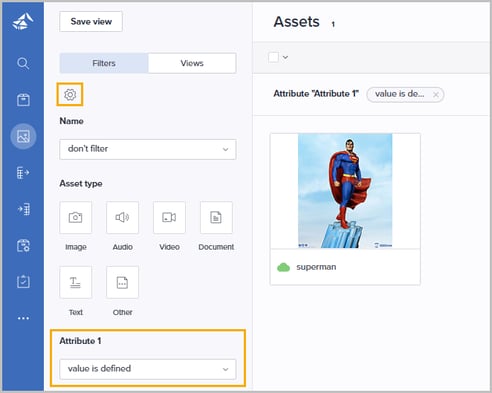
- Products: Advanced grid sorting
We’ve introduced a new capability that allows you to sort your product grid by Dictionary, Multiselect, and Singleselect attribute values. This feature provides greater flexibility in organizing your view, allowing you to quickly group and navigate products based on complex attribute types. - AI Image Enhancer
ℹ️ Currently available in the Test environment ℹ️
We’re introducing AI-powered image enhancement directly in Bluestone PIM.
A new tab can be made available in the Asset's details panel, where users can prompt the AI - powered by Google’s Nano Banana - for improved visuals and editing support.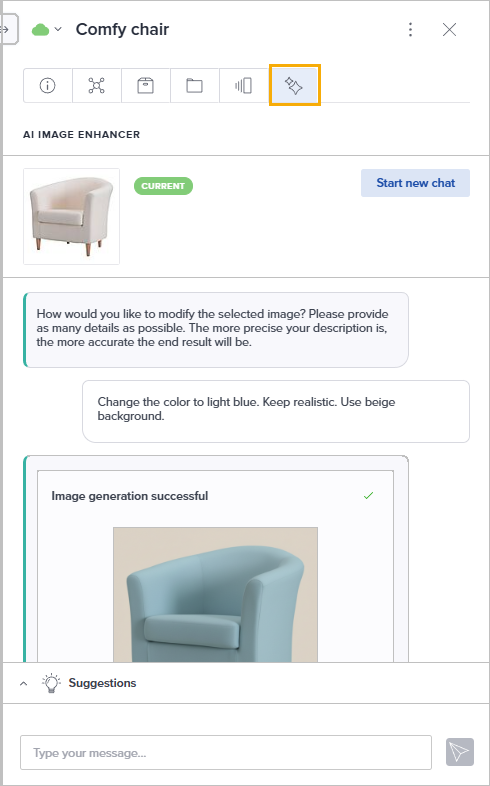
Interested in trying it out? Reach out to our support team to learn more: support@bluestonepim.com - Shopify connector: Easily manage product data sync from Bluestone PIM
ℹ️ Currently available in the Test environment ℹ️
You can now manage the synchronization of product data from Bluestone PIM to one or more Shopify stores in an easy way.
Interested in trying it out? Reach out to our support team to learn more: support@bluestonepim.com
Improvements
- Product import: Enhanced source visibility
To simplify the data import process, the mapping view now permanently displays the original column headers from your source file. Previously, mapping a column would replace the file's header with the system attribute name. By retaining the "mapped from" names, you can now easily audit and verify that your source data is correctly aligned with the target attributes: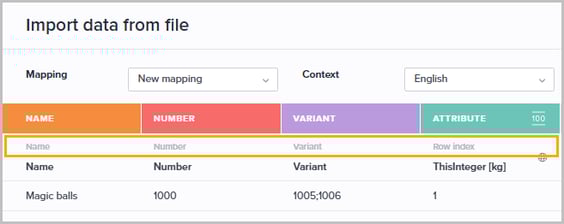
- Assets: Expanded filter operators
We have aligned the Assets filtering options with the Product module. When filtering by Name, Description or Original file name, you now have access to a full range of operators, such as 'is defined' and 'is not defined'. This allows you to quickly identify assets with missing metadata.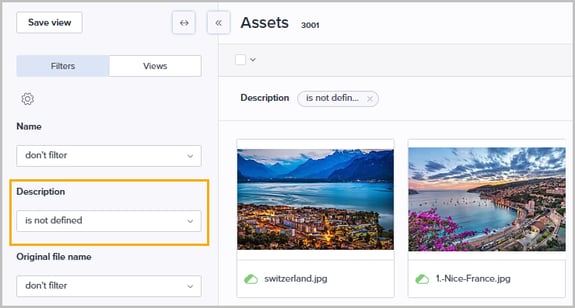
- Products: Sticky modal preferences
Your selected contexts in the Sync and Change status modals are now saved across logins. Selections reset upon context-switching for accuracy - except for the 'All' option, which stays active across all context changes. - Completeness requirements: Grid display optimization
We have improved the layout of the 'Applied to categories' column to ensure a cleaner interface. To prevent text overlap when a requirement is linked to an extensive list of categories, the column now intelligently truncates based on available screen space, maintaining grid readability. - Accelerated plugin development & evaluation
Developing custom plugins is now more efficient thanks to a series of framework improvements. A new one-stop technical README now provides clear guidance on PIM standards to ensure high-quality builds.
Additionally, a new portable template is available for rapid research and evaluation, enabling developers and prospects to explore the framework immediately, even without full system credentials. - Catalogs/categories: Streamlined editing
We’ve upgraded the Category Details tab with inline editors, replacing traditional form fields for a faster, more consistent editing experience that aligns with the rest of the PIM: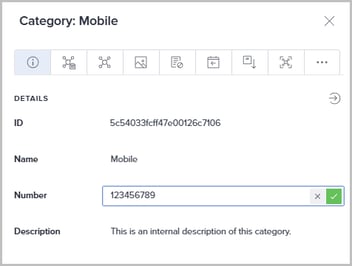
- Assets: Expanded bulk selection & actions
Break free from page limits with the new 'Select all' feature, allowing you to target every asset matching your filters at once.
This release removes the previous 100-item selection cap, and enables large-scale bulk Delete actions - laying the groundwork for more batch operations in upcoming releases. Please see the Help documentation for more information. - Attribute definitions: High-scale performance enhancements
We have significantly optimized the attribute management experience to seamlessly support environments with several thousands of attributes. This update introduces "under-the-hood" improvements to ensure the UI remains fast and responsive even under heavy loads.
Fixes
- Improved search reliability in Query builder preview
We fixed a bug where searching for specific products within the 'Products preview' window would sometimes fail on consecutive attempts. - Fixed advanced filtering options for Assets
We resolved an issue where the "is defined" and "is not defined" operators returned incorrect results for asset names, original file names, and descriptions. These filters now accurately identify assets based on the presence or absence of content in these fields, ensuring your search results are reliable and precise. - Improved PAPI reliability
We patched a rare software flaw where invalid session states could cause category data to be inadvertently removed from the public API. This fix ensures that products remain consistently visible and available across all connected webshops. - Resolution for bulk archive failures
We have addressed an issue where the bulk archive endpoint failed to process certain requests, occasionally preventing items from being archived correctly. This fix ensures that all bulk archive operations are now handled reliably and complete as intended, even when processing large or complex datasets. - Unified product validation
We have resolved an inconsistency where the Personalized Product Editor (PPE) did not mirror the validation logic used in the main Products module. With this fix, required fields will correctly display red borders when empty, and completeness requirements will stay "incomplete" until all necessary data is provided, ensuring a reliable and synchronized experience across both interfaces. - Resolved access errors in PPE and Products modules
We patched a flaw that caused the Personalized Product Editor (PPE) and Product module to fail when assigned access policies were deleted or modified. This fix eliminates the "Failed to fetch catalog nodes" error, ensuring that categories and products remain accessible to users even after administrative permission changes. - Improved reliability for product relation imports
We resolved an issue where importing new relations would fail if a product already had more than 100 existing links. By implementing proper pagination support for the import process, the system now successfully handles additions to products with large datasets as intended.