![Bluestone_PIM_white_logo_RBB-3.png]](https://help.bluestonepim.com/hs-fs/hubfs/Bluestone_PIM_white_logo_RBB-3.png?height=50&name=Bluestone_PIM_white_logo_RBB-3.png)


- Assets: Enhanced resize control
We have added a newonly-shrink-largerparameter to our Resize transformation. This allows you to restrict resizing to down-scaling only, ensuring that images are never stretched or upscaled if they are already smaller than your target dimensions. This is an essential tool for maintaining high image quality across your digital channels. Please see the Help documentation for details. - Assets: Next-gen image support with AVIF
We have expanded our image transformation options to include theAVIFformat. As a successor to webp, AVIF provides superior compression and higher visual quality at even lower bitrates. This allows you to significantly reduce bandwidth usage and improve page load speeds for your end users without compromising on image clarity. Please see the Help documentation for details. - Completeness: Product type-specific requirements now supported
You can now define completeness requirements based on product type, offering greater flexibility and control - especially if you are using variant modeling with inherited product data and assets.
This enhancement allows you to tailor completeness rules more precisely across different product types in your assortment. Please see the Help documentation for details.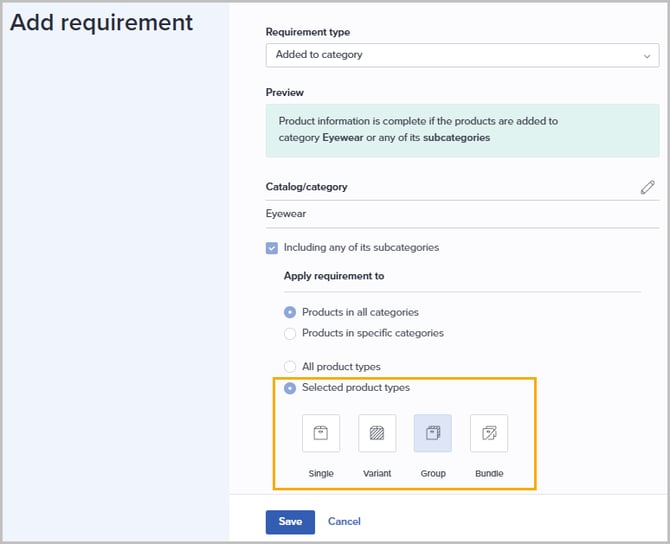
- AI Image Enhancer
ℹ️ Currently available in the Test environment ℹ️
We’re introducing AI-powered image enhancement directly in Bluestone PIM.
A new tab can be made available in the Asset's details panel, where users can prompt the AI - powered by Google’s Nano Banana - for improved visuals and editing support.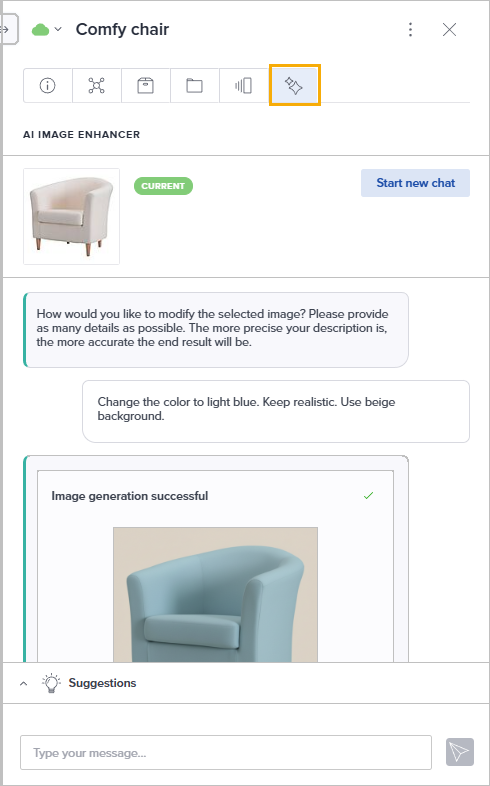
Interested in trying it out? Reach out to our support team to learn more: support@bluestonepim.com - Shopify connector: Easily manage product data sync from Bluestone PIM
ℹ️ Currently available in the Test environment ℹ️
You can now manage the synchronization of product data from Bluestone PIM to one or more Shopify stores in an easy way.
Interested in trying it out? Reach out to our support team to learn more: support@bluestonepim.com
Improvements

- Import & Export: Enhanced traceability
To improve auditability and team coordination, we have added new columns to the job grids. You can now see 'Imported by' in the Import grid and 'Exported by' in the Export grid, making it easy to identify which user initiated a specific job at a glance. Please see Import and Export for more information. - PPE: Enhanced product access filtering
The option to filter product access by a specific attribute value has been updated to include Boolean attributes. System Admins can now use True/False flags to dynamically determine which products are visible to specific users or groups within the PPE, streamlining the governance process. - Attributes: Improved multiline field interaction
We have streamlined the editing experience for Multiline attributes. You can now begin typing immediately upon clicking into the field, providing a seamless workflow consistent with Formatted text attributes. - Completeness: Removed uniqueness restriction
You can now define multiple completeness requirements with the same main parameters, enabling more flexibility - especially when targeting different product types. - Languages: Improved handling of attribute definition translations
We've addressed two translation-related issues to improve flexibility and alignment with expected behavior:- Allowing removal of attribute name translations
You can now clear an existing translation for an attribute definition name by leaving the field empty and saving. - Partial translation of select-attribute values
It's now possible to save translations for only some values in a single- or multi-select attribute definition. Any untranslated values will follow the fallback context logic, if one is configured.
- Allowing removal of attribute name translations
- Product overview tab: Improved visibility logic for the completeness score widget
The completeness score widget is now only shown when relevant:- If no completeness requirements are defined for the organization, the widget will be hidden.
- If requirements are defined but none apply to the current product, the widget is shown with the message: “No completeness requirements apply to this product”.
Fixes

- Rules engine: Fixed Dictionary value filtering
Resolved an issue where dictionary values were non-functional in the 'Product query' filter. This fix restores the ability to filter rules based on dictionary attribute values used in the query. - Product sync: Resolved issue with version conflict errors
We’ve fixed an issue where syncing product updates failed due to a "Version conflict" error. This prevented users from proceeding until they manually retried the sync, sometimes multiple times. The sync process is now more reliable and handles version conflicts correctly, reducing the need for repeated manual attempts.