![Bluestone_PIM_white_logo_RBB-3.png]](https://help.bluestonepim.com/hs-fs/hubfs/Bluestone_PIM_white_logo_RBB-3.png?height=50&name=Bluestone_PIM_white_logo_RBB-3.png)

⚠️ Endpoints to be terminated - action required ⚠️

- Introducing Product Families: A three-level product hierarchy
ℹ️ Currently available in the Test environment ℹ️
Managing complex product lines just got a whole lot easier! Bluestone PIM now supports a three-level hierarchy - Family → Group → Variant - giving you a powerful new top-level container for organising multiple Groups, managing data at a higher level, and inheriting it down through the hierarchy.
Perfect for fashion, electronics, and any catalogue with multiple layers of variation. And if you don't need it, no worries - your existing setup is completely unaffected.-png.png?width=670&height=710&name=Product%20Hierarchy%20Diagram-selection%20(3)-png.png)
Please see Product families: Three-level product hierarchy for more information. - Rules engine: AI linguist automation is here!
AI linguist is now supported in the Rules engine! Translate text, improve text, and spell check can now all be automated across products matching a defined query - triggered automatically, just like AI enrich, with no manual intervention needed.
Let the Rules engine handle the linguistic heavy lifting!
Please see the Help documentation for details.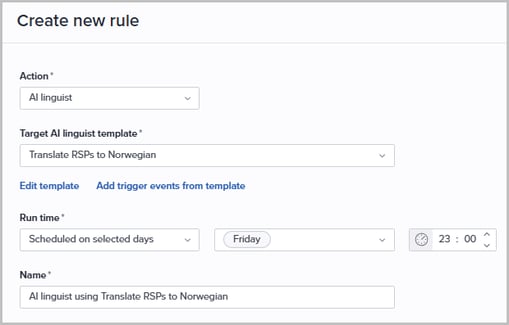
Interested in trying it out? Contact our support team to have it enabled for your organisation: support@bluestonepim.com - Improved PDF preview: Navigate multi-page documents inline
PDF documents can now be previewed in full within Bluestone PIM, without leaving the page. Clicking a PDF thumbnail in the Product Overview tab, Product Assets tab, or Asset Details tab opens a full document viewer with page navigation controls.
No more single-page static previews!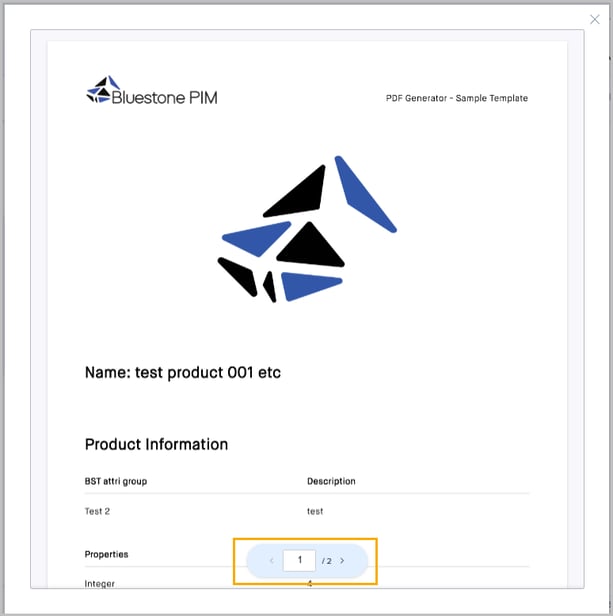
- Bluestone PIM MCP server: Official external access
Use the MCP to connect AI assistants directly to your PIM with our 80 dedicated tools. Once you sign in, the assistant can inspect your organisation's data, perform the actions your Bluestone permissions allow, and search indexed platform guidance. The MCP will respect the user's configured permissions.
You may have already tested out using Bluestone PIM in your LLM via Bluestone PIM Labs. We collected your feedback and have incorporated many points into the newly released Bluestone PIM MCP server! Thank you to our Lab assistants for your insights.
Please see the Bluestone PIM MCP overview to get started. - Attributes: Assign and unassign policies in bulk
No more assigning and unassigning policies one by one! Administrators can now do this across multiple attributes at once from the attributes grid, specifying read or write access for all selected attributes in a single action.
Please see the Help documentation for details.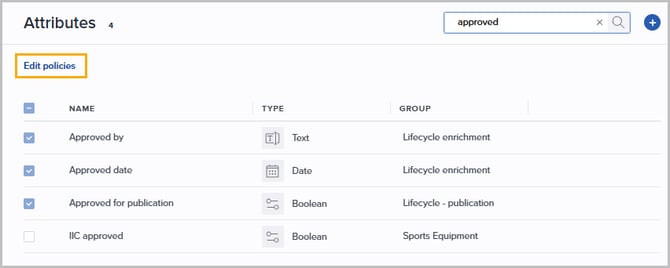
- 3rd party plugins: Conditional display for product and category tabs
Third-party plugin developers can now control when a product or category tab is shown by defining ashouldShowfunction in the plugin configuration. This allows tabs to be hidden when they are not relevant to the current product or category context, reducing UI noise and improving the overall experience.
The 3rd party plugin development documentation has been updated with examples.
Improvements
- Access management: More granular Media permissions
Media (assets) permissions are now more granular, giving administrators greater control over what users can do in the DAM.
The following permissions are now supported independently, making it possible to e.g. grant users the ability to manage and assign existing assets without allowing them to upload new files: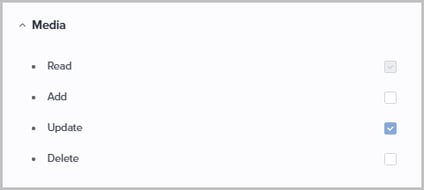
- PPE: Control asset upload access
A new permission has been introduced, linked to 'Media | Add', allowing administrators to control whether PPE users can upload new assets to the DAM: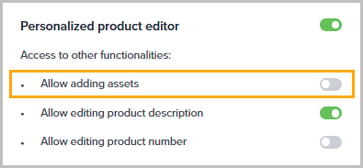
- PPE: Extended support for HTML and Markdown attributes
HTML and Markdown attributes can now be included in the PPE configuration for both editing and filtering, bringing these rich-text attribute types in line with the options already available for other attribute types.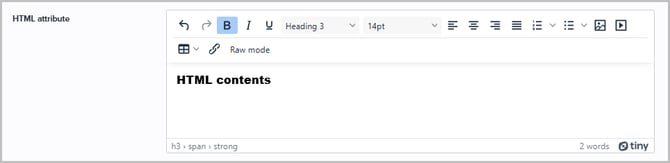
- Translations module extensions
We are continuing to centralize translation workflows by migrating more features from the deprecated Languages page into the new UI.
Now Relations can also be translated from the Translations module. Please see the Help documentation for details. - Categories: Better performance for large category trees
Where there are many subcategories at the same level, a Load more button now keeps the tree fast and responsive rather than loading everything at once. - Import and Export: Interrupt a running session
You can now interrupt an in-progress import or export session directly from the UI, giving you more control when a job needs to be stopped without waiting for it to complete.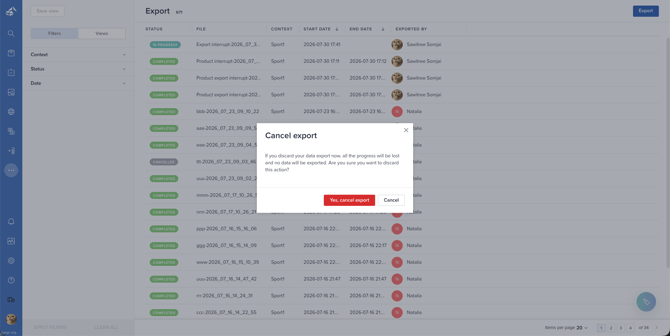
- AI Agent: Improved stability
We've made stability improvements to the AI Agent for a smoother, more reliable experience. - Improved display of boolean values
Boolean fields now display a filled circle icon alongside the text label, making it quicker and easier to distinguish between Yes and No values at a glance: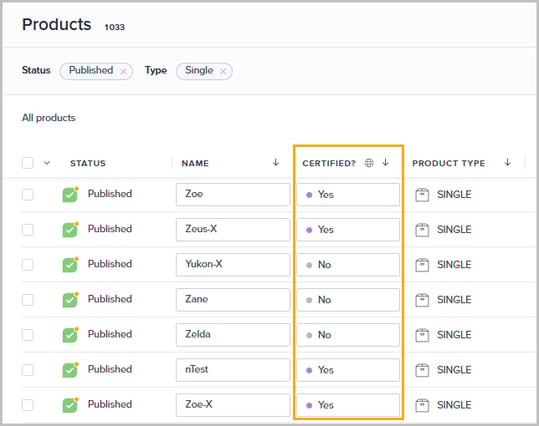
- Rules engine: Auto-select context in AI enrich configuration
When configuring AI enrich triggers in the Rules engine, the context is now automatically pre-selected if only one context is available in the organisation - saving an unnecessary manual step: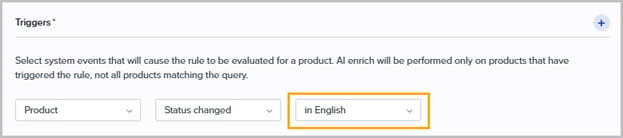
For organisations with multiple contexts, the existing behaviour is preserved and the user selects the context manually. - PPE: Improved display of long Dictionary and Multiselect values
Dictionary and Multiselect attribute values in PPE are now truncated with an ellipsis when they exceed the available width, rather than being cut off abruptly. The truncation and layout are now consistent with the standard Product details panel: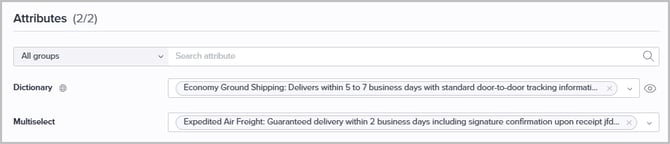
- Categories: Preview complete list of selected Dictionary attribute values
A new Preview option is now available for Dictionary attributes in the CLA and Attributes tabs of a Category, making it easy to view the complete list without leaving the page: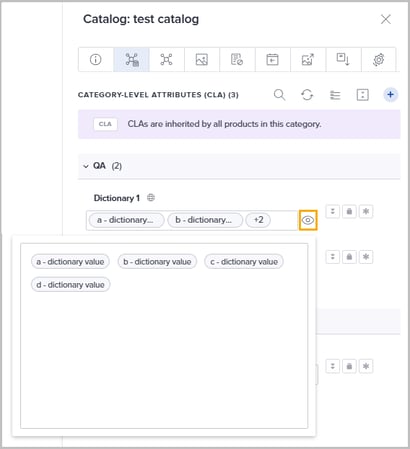
Fixes
- Resolved: Public API returned archived categories
Fixed an issue where the Public API category endpoint returned archived categories. Archived categories are now correctly excluded from the response. - Resolved: Navigating to products and PPE with filters applied
Fixed an issue that affected navigation to products and to the Personalized Product Editor (PPE) when filters were applied. - Resolved: Orphaned references after deleting select values
Fixed an issue where dead references were left behind when a product or category was unarchived. This occurred when a Dictionary, Singleselect, or Multiselect attribute definition value was deleted while the product or category was archived.
References are now consistently cleaned up across products and categories, and existing orphaned references in production have been resolved as part of this fix.
Endpoints planned for removal October 1, 2026
The following endpoints were deprecated on October 30, 2025 and reached End-of-Life on July 30, 2026. They are planned for removal on October 1, 2026.
Refer to the migration guide which includes all technical details and a checklist. Please get in touch with Bluestone Servicedesk if you have questions or need help.
Service: bluestone-media-bank
 Deprecated: Describe working assets. Search enabled by assetIds with paging.
POST /assets/search/by-ids
Documentation
 Replacement: Retrieve multiple assets together with the requested views.
POST /assets/views/by-ids
Documentation
Deprecated: Describe assetGET /assets/{id}
Documentation
Replacement: Retrieve a single asset together with the requested views.POST /assets/{id}/views
Documentation
Keep track of upcoming releases!
Check out the Bluestone PIM Release Calendar
Want to be notified about new features, improvements, and fixes?
Sign up to receive our Release notes!