![Bluestone_PIM_white_logo_RBB-3.png]](https://help.bluestonepim.com/hs-fs/hubfs/Bluestone_PIM_white_logo_RBB-3.png?height=50&name=Bluestone_PIM_white_logo_RBB-3.png)


- Attribute history: Compare current and historical values
A compare feature has been added to the attribute history for Text, Multiline, and Formatted text attributes. Selecting a historical version from the history list allows you to view a side-by-side comparison with the current value, making it easier to see what has changed when reviewing or updating content.
Please see the Help documentation for details.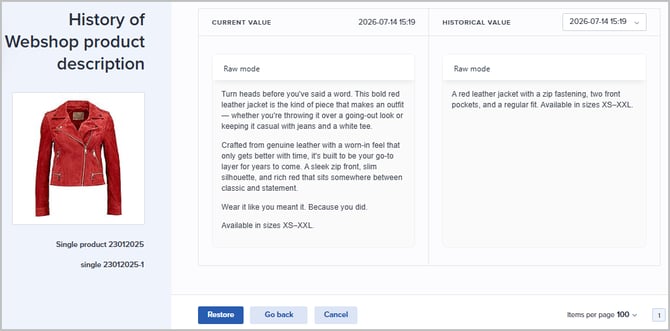
- Granular permissions for Assets
To give you more precise control over your digital assets, we have split the bundled 'Media|Write' permission into granular rights - matching the flexible permission structure already used for Products.
This update allows PIM administrators to maintain strict DAM data governance while safely empowering enrichment teams. For example, you can now easily allow sales or external teams to link images and update attributes, while restricting file uploads and deletions strictly to your core media administrators: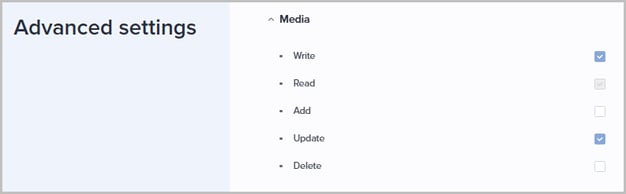
- Introducing the AI agent!
We’re excited to announce the chatbot-style AI feature that will let you interact with Bluestone PIM using plain, everyday language - no complex query building required.
To use the AI agent, you must be explicitly granted access by your system administrator. Please see the Help documentation for details.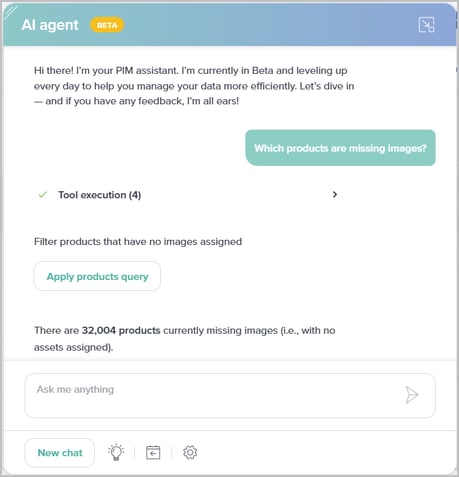
- AI-powered rules: Automate product enrichment!
Leverage AI directly within the Rules engine to populate product attributes automatically, using your existing images and product data as input.
This reduces manual data entry and helps maintain consistent, high-quality content across your sales channels.
Please see the Help documentation for details.
- New Translations app
Manage translations of e.g. attribute names and dictionary attribute values from the new Translations module, with multi-context support and filtering for missing translations. More translation pages will follow in upcoming releases.
Please see the Help documentation for details.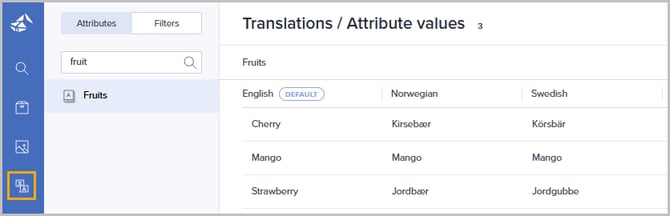
- AI Image enhancer
ℹ️ Currently available in the Test environment ℹ️
We’re introducing AI-powered image enhancement directly in Bluestone PIM.
A new tab can be made available in the Asset's details panel, where users can prompt the AI - powered by Google’s Nano Banana - for improved visuals and editing support.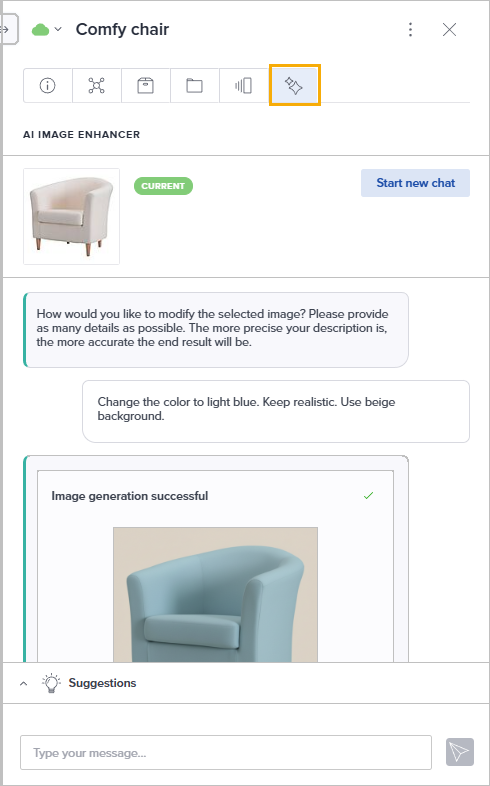
Interested in trying it out? Reach out to our support team to learn more: support@bluestonepim.com
Improvements
- Auto-refresh after editing from the Product Issues tab
Product details now update automatically when changes are made from the Product Issues tab - no manual refresh needed:- Assets added via the Product Issues tab are immediately reflected on the Assets tab.
- Fixing data on a published product now correctly updates the status to 'Updates to be published'.
- More color options for Dashboard widgets
The color palette for 'Saved view (number)' widgets on the Dashboard has been expanded, giving you more choices when adding or editing a widget. This makes it easier to organize and navigate your Dashboard at a glance: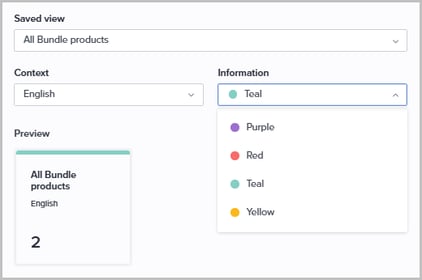
- PPE: Support for Date, Time, and Date & Time attributes
Date, Time, and Date & Time attributes are now supported in the PPE setup, allowing PPE users to view, edit, and filter by these attribute types: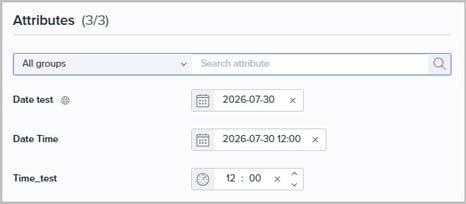
-
Translations module extensions
We are continuing to centralize translation workflows by migrating more features from the deprecated Languages page into the new UI.What’s new in this release:
- Product labels can now be translated from the Translations module.
-
Value translations for all remaining attribute types are now handled within the Translations module.
-
Translating Attribute Group names is now fully supported directly within the module.
-
Dictionary value numbers are now displayed in a separate column for improved clarity.
Stay tuned - more translation pages will migrate in upcoming releases! Please see the Help documentation for details.
- AI enrich: Support for parent-child Dictionary dependencies
AI enrich now respects parent-child Dictionary attribute dependencies when enriching products. When a parent Dictionary attribute has an existing value, the AI will use it as context and restrict its selection to only the valid child options defined by the dependency — ensuring enriched values are always consistent with your data model. - PAPI: Asset attributes added to Category endpoints
Public API category endpoints now include asset attributes directly in their response payloads. This aligns category behavior with existing product endpoints, allowing integration developers to retrieve complete category and asset data in a single call without needing separate queries to the MAPI.
Note! To surface asset attributes for unchanged categories, run the
/category/state/resync(resync category states in PAPI Sync) endpoint before performing a standard sync. - Products: Improved Completeness score filter
Updated the completeness score filter to use distinct, non-overlapping ranges, making it easy to accurately isolate "nearly finished" products from those that are fully complete: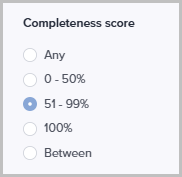
- Improved product unarchive validation
We have improved the unarchive workflow to better handle duplicate data. The system now displays a clear validation message if a user attempts to unarchive a product with a product number that is already in use by an active product. - Completeness requirements: Support for both directions of two-way relations
Completeness requirements can now be configured independently for each direction of a two-way product relation, allowing each category - such as main products and accessories - to enforce its own data quality rules.
Please see the Help documentation for details.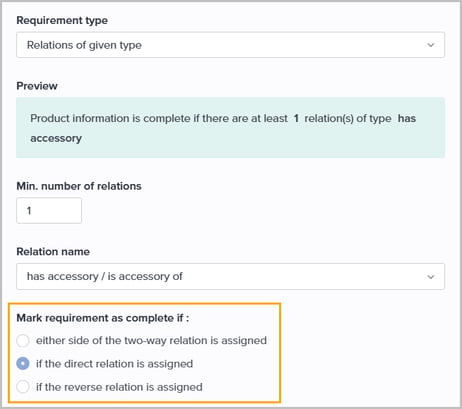
- XLSX/CSV import: Improved error reporting
The import error report now captures multiple errors per product in a single run. Previously, processing would stop at the first error encountered for a product, requiring repeated import attempts to surface and fix issues one by one.
With this change, more errors are reported at once, allowing them to be corrected in a single pass and significantly reducing the number of iterations needed to complete a successful import. - Webhook: New event for asset order changes on products
A new event, Product assets order changed, is now available for webhook subscriptions. An update event is triggered whenever the order of assets linked to a product is changed, allowing integrations to stay in sync with asset ordering updates.
Please see the Help documentation for more information.
Fixes
- PPE: Saved view filters now correctly reflected
Fixed an issue where Multiselect, Singleselect, and Dictionary attribute value filters were not reflected in the Filters panel when a PPE user opened a saved view via a Dashboard widget. - PPE: Fixed incorrect counts on Dashboard widgets and in category navigation
Fixed several related issues where product counts were displaying incorrectly or as 0:- Dashboard widgets showed 0 products after navigating to PPE and back.
- Navigating to PPE via a Dashboard widget incorrectly retained the previously selected category, resulting in 0 products shown.
- Catalog and category counts were wrong or showed 0 due to loading not finalizing correctly.
- 'Clear all' filters now working correctly
Fixed an issue where clicking 'Clear all' in the filters section above the grid failed to remove the applied filters in certain locations:
-
Fixed: Formatted text attribute creation during import
Resolved an issue where the UI broke when selecting the content type for a new Formatted text attribute during the import mapping process. Choosing between HTML and Markdown now works as expected.
- Fixed: Global search (hotfixed June 17)
Fixed an issue where entering a search term returned no results. The search functionality now correctly displays all matching products. - Resolved: Dictionary filters
Fixed an issue where dictionary values displayed as "Not Translated" or returned "No Results Found" when using dropdown filters. This occurred when linking products within a task or viewing product history in different contexts. These filters now display and resolve correctly across all areas.
- Fixed: Asset labels not filtered by file type
Resolved an issue where all asset labels were shown when editing an asset, regardless of the file type restriction configured on the label. Only labels applicable to the asset's file type (or configured for all file types) are now displayed.
- Resolved: Variant-defining attribute propagation setting not preserved on product duplication
Resolved an issue where duplicating a product would not carry over the propagation setting for variant-defining attributes. This caused a mismatch between the UI and the underlying data - the attribute appeared non-inherited in the UI, but the API still returned it as a defining attribute. The propagation setting is now correctly duplicated along with the product.
- Fixed: Syncs failing with internal sync error
Resolved an issue where syncs would fail caused by dictionary values being incorrectly associated with non-dictionary attributes on categories. This occurred in specific cases involving restricted users. The filter logic has been corrected to ensure dictionary values are only associated with the intended attribute. - Resolved: Race condition leaving latest asset version unpublished
Resolved an issue where adding a new asset version and publishing the asset simultaneously could leave the latest version unpublished. The publishing process was reading from a stale snapshot, causing the publish step to be skipped. The fix ensures the current asset state is always read at the time of version creation.
Keep track of upcoming releases!
Check out the Bluestone PIM Release Calendar
Want to be notified about new features, improvements, and fixes?
Sign up to receive our Release notes!